

People are working collaboratively now more than ever. The biggest reason for this shift in workplace behavioral interaction, has been the rapid pace of technological enhancements, in both computer software and hardware.
For example remote servers and databases have removed the need for onsite physical infrastructure together with the subsequent liability and maintenance that comes with it. This in turn has given rise to the age of cloud computing, resulting in an obvious realization for business – that is, employees do not need to be based in the office behind a desk in order to get work done. In fact studies today are showing us that remote employees in business are more productive than those stationed in the office. Believe it!
Productive collaboration amongst a decentralized workforce has become paramount and the best way to engage with a remote workforce is without doubt Video conferencing. Benefits include; reduced travel time and costs, optomised attendance, improved meeting efficiency, better communication, greater productivity due to better decision making, higher employee retention due to more flexibility. Remote collaboration via video conferencing maintains healthy co-worker relationships which studies show, people miss the most when leaving the work place.
However, getting the team live all at once and operational brings with it challenges for satisfactory team work. For example, user confusion, network issues, expired video conferencing software licenses, PC issues, firewall restrictions, low quality camera and audio, and communication issues with the organizer before and during, are amongst some of the problems.
One way to remove all this unnecessary friction around remote collaboration, is to collaborate in iOS. iOS (Apples native iPhone and iPad operating system) removes the confusing hurdles and loops that one has to navigate through in order to be able to communicate. Apps are designed to be intuitive and fast to operate. iOS also brings with it a very short learning curve which makes for a more seamless transition for staff to become accustomed to and learn.
Group FaceTime Example (Below)
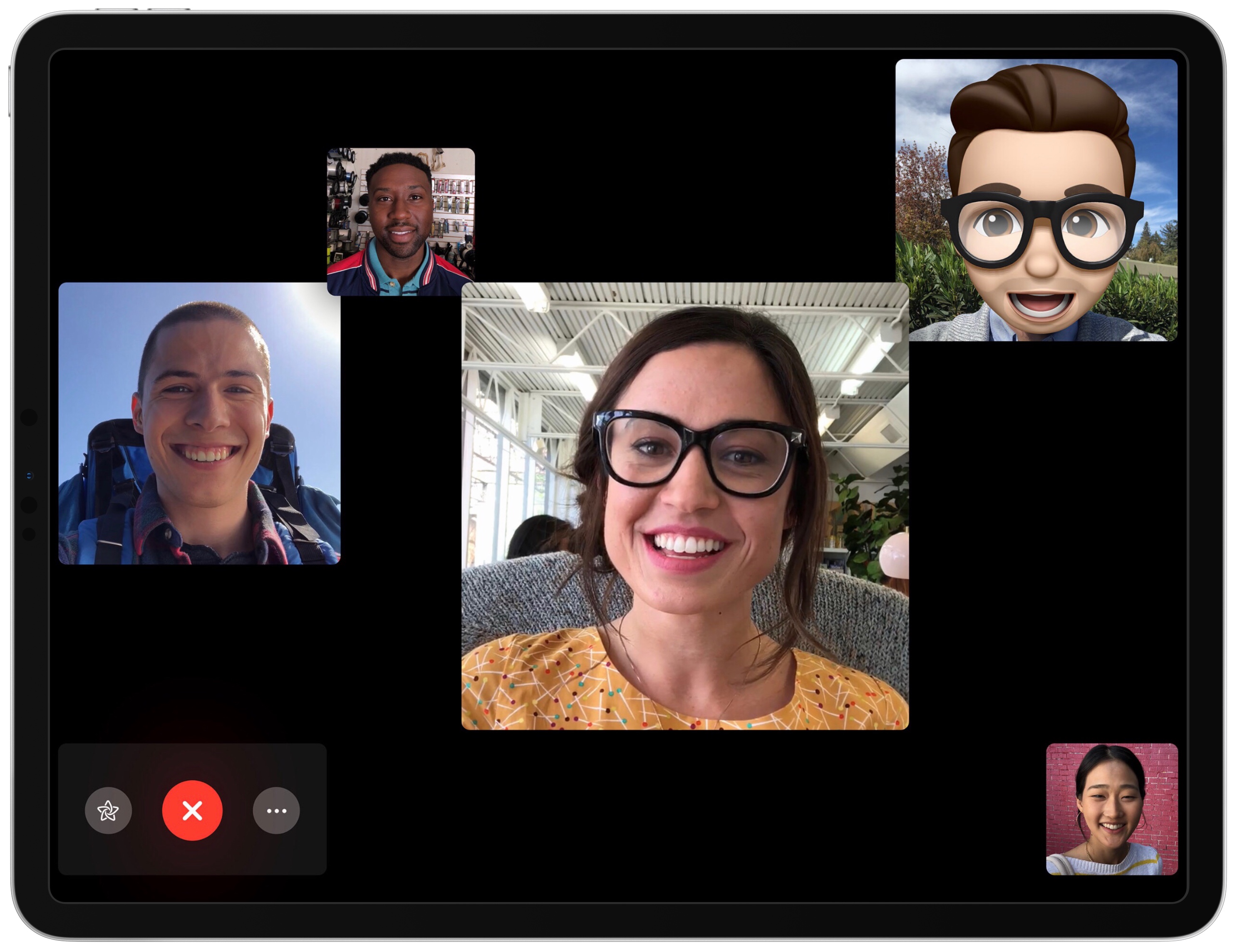
With iOS everything feels intuitive and natural. Software opens instantly, noticeably faster than PC’s or notebooks. Conference calling apps are launched in seconds with just an easy tap. Video and audio quality is excellent due to the iPad’s superb front facing camera and built in microphone. Communication between the meeting organizer or team leader can be done effortlessly via Messages (formally iMessage). System notifications can be turned off for less interruptions and there are no anti-virus pop ups or expired software licenses to deal with moments before the meeting starts. Software i.e Apps, are also considerably cheaper on iOS compared to Pc’s or Notebooks.
Multi-tasking
Multi-tasking is an important aspect of being able to engage and perform productively as a team. With iOS, Split Screen multitasking is fast and effective. Apps snap into place quickly, maximizing screen real-estate and removing the need to resize and manage windows which inevitably hide or overlap each other on traditional pc’s and notebooks.
Split Screen, Slide Over and Picture in Picture mean that team members can effectively have 4 screens neatly displayed and running live at the same time and a 5th if you include your iPhone on a stand.

Note Taking
Note taking on iOS is as effective as it is on it’s PC counterparts but with the advantage of being more intuitive to use. The native Apple Notes app is excellent for group work. Collaboration in Apple’s Notes app is a breeze to set up, enabling multiple team members to edit the note at the same time. When a team member edits the note you are notified by a handy notification alert and such notifications feel respectful and unobtrusive, thanks to iOS’s elegant private design. Information added by team members is clear and easy to identify, thanks to the “highlights” feature which can be easily toggled on or off. This means when returning to an old note, identification of who’s added what to the note is obvious. Notes are also fast and easy to find via “Spotlight Search” which can be triggered by a simple keyboard shortcut (Command + Space).
Team Chat
Team chat during the meeting can also be done in Messages or even Slack’s iOS app, this type of instant messaging system is great when the conversation is not intended for the whole group. Members can chat silently amongst themselves via Apple’s Messages app, as apposed to having to whisper in a physical meeting and try not interrupt or distract the person speaking. Message notifications can be sent away quickly via a simple “swipe up” gesture, or if one prefers can be set to persistent, so you never have to worry about missing an important message from a VIP contact, manager or boss.
But its not just businesses that can take advantage of these tools, education is a prime candidate for collaboration in iOS too. Students can take advantage of this workflow for projects and assignments making work more enjoyable and easy to accomplish. How I wish I had these tools when I was a student, how different homework and assignments would have been. Thankfully I have embraced them for business and what a game changer it has been!


Leave a comment