
The Finest PDF editor on iPadOS, by far!

One of the most useful apps a person can own in the 21st century, is a PDF editor and here’s the one we recommend above all others.
Wether you are working on company documents, filling out banking forms or viewing your kids school report, its highly likely your doing it in PDF format. This is because PDF’s are hands down the most commonly received document format in the world, largely because they protect the original design, layout and composition and do so with very small file sizes.
However this strength which makes PDF’s so popular, can also make them difficult to work with and so choosing a good PDF viewer and editing tool can save you a ton of time and frustration down the line. This is even more important if you are using it in businesses where productivity, time and professional features are crucial to getting the job done correctly and quickly, the first time.
Work
For most businesses including the one I work in, manipulating PDF’s is a near daily occurrence, so the PDF tool I needed had to be designed first for iPad Pro and be optimized for iPadOS’s latest features.
I think it is important to explain my workflow, so that you have some context for my requirements. I typically work in split screen with two apps side by side and a third app such as; iMessage, 1password, notes, Fantastical, Numbers, Files or my task manager in slide over for quick easy reference, so the PDF app I need has to work with all the latest iPadOS features and multi-tasking.
I do allot of editing and manipulating of brochures and marketing material sent in PDF form from our oversea’s suppliers and these days with online brochures and PDF’s becoming more interactive and functional, I need something on a more professional Level for iPad Pro.
This is where PDF Expert by Readdle comes in! I’m not going to bore you with all the PDF apps I’ve tried in the past and why they didn’t cut it, instead I’m going to tell you why I love PDF Expert.
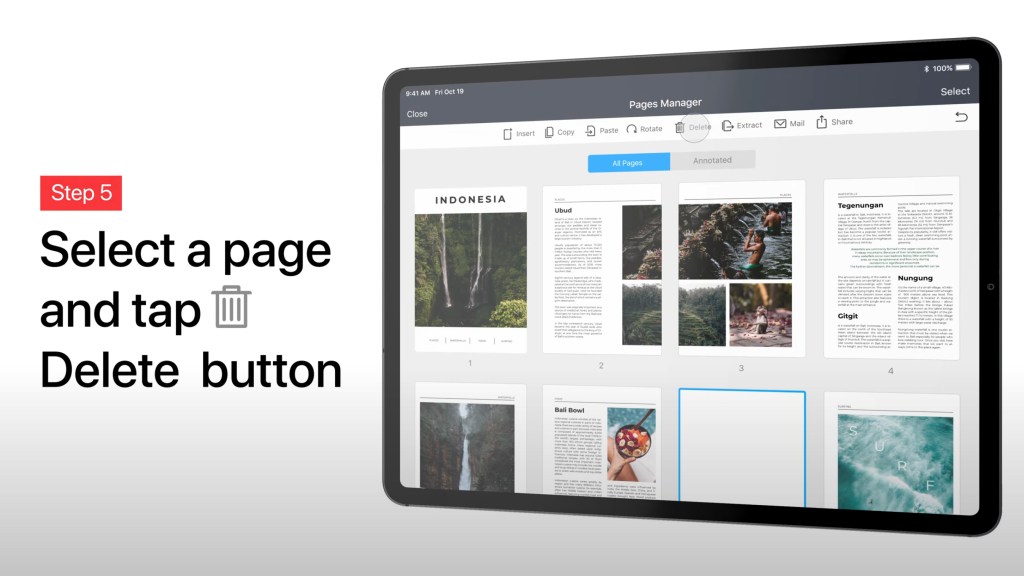
I have found PDF Expert makes my work much easier. Tasks that usually take up a lot of my time are faster and more intuitive to do. Things like editing brochures and marketing material for instance; adding our company’s address, contact information, removing pages, text and images, replacing clickable hyperlinks with ones that point to our own address, I find are all much faster and actually more enjoyable to do now with PDF Expert.
For those who may not know, Readdle (the company behind PDF Expert) has had a very long history with the App Store. They launched their first App on the very first day the App store went live in 2008. To date Readdle have over 100 million App Store installations world wide and are frequently rated top of their apps category on the App Store.
I am actually finding their file system “Documents” which is their competing app to Apples Files app, very tempting to move to! I leave that for another review later on.

Another feature I am really enjoying recently is the Presentation Mode with Apple’s SharePlay. PDF expert have integrated this beautifully and it works seemly with SharePlay. This is so nice to use to use in business to explain changes on a document, website, presentation or anything really because you can simply annotate over the presentation using your Apple Pencil or cursor. This feature makes real time collaboration so intuitive and easy to initiate.
Personal life
In my personal life my wife and I embrace a minimalist lifestyle, and one such area we are particularly proud of, is our paper presence or rather, lack thereof. With the exception of a few crucial documents like birth certificates, marriage certificates, qualifications etc, we are fully paperless! Being paperless gives you a surprisingly liberating feeling, in large part because it frees up so much space that would otherwise be occupied by all the stuff we need to manage our paperwork, such as; files, storage boxes, stationary, paper reams, ink cartridges, a printer, documents, etc. One forgets how much space all this takes up and how much clutter it creates. PDF Expert has enabled me to fully transition to a paperless lifestyle.

Recently I have been updating my life insurance, it’s of course important to do as a persons family expands and as more kids come into the picture. But goodness it is a lot of back and fourth, with a plethora of documents! PDF Editor coupled with the Apple Pencil makes this process much more enjoyable and manageable.
This combination has helped to speed up other document intensive areas of my life, such as my kids school paperwork, from enrollment forms, contracts, indemnities, etc, its allot.
Power features that put you in control
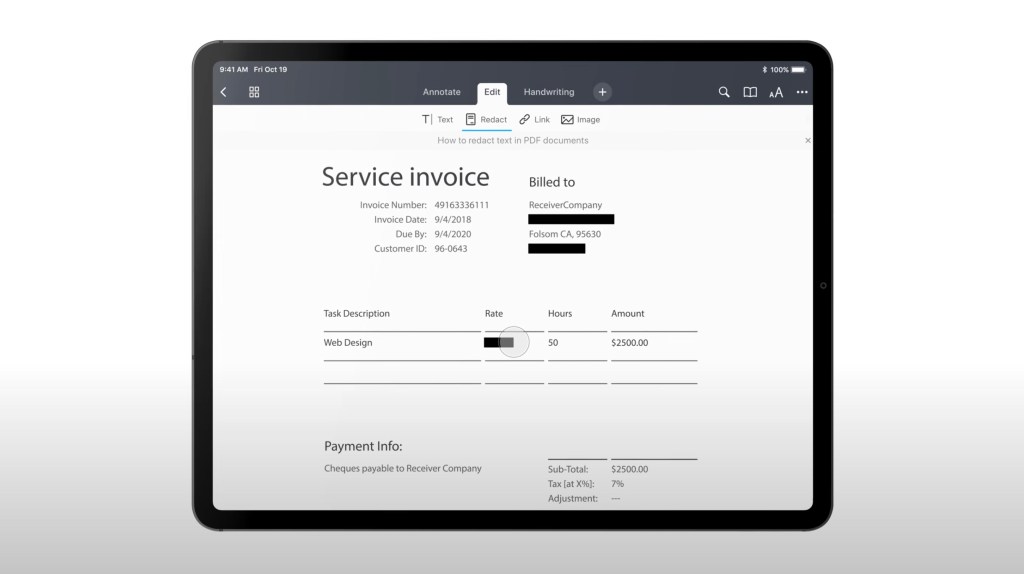
As a very privacy conscious person, I really dislike sending out my bank statements, and it seems like when applying for anything these days, you are required to do so. Well with PDF Expert there is a brilliant feature which helps make this task a bit more palatable. It’s called “redact” , this has become one of my all time favorite features, you can simply “black out” the info you don’t think people need to see, and with speed too. It’s super fast and looks professional, this has completely changed my feelings towards sending out anything with sensitive information, because I just redact it. I love this!
Measure
I recently stumbled across PDF Experts “measure” tool, this is a new feature set that allows you to work directly from an architects floor plan. My Wife and I recently purchased a new home that is busy being built and we needed to measure curtain rails, desks and which furniture would fit in from the floor plans. So I imported the floor plan into PDF Expert and tapped on the “Measure” tab. PDF Expert automatically recognized the scale of our floor plan and had it ready for me to confirm!, its features like that, which set PDF expert apart from the rest.
I was impressed to see PDF Expert has some very intelligent and impressive AI which detects precise lines and edges of the building plan and allowed me to measure either distance, area and perimeter. This worked perfectly and we were even able to check the area of the rooms ourselves, as apposed to relying on the architects coming back to us, it was intuitive and easy to use and put us in control of our building plans.

Another feature I absolutely love, is the “reduce file size” feature. I dislike zipping files because customers can sometimes find them finicky to open and it adds a layer of friction to your customers email. PDF Expert gives you the option to simply reduce the file size to avoid this and its excellent. Sometimes I find it difficult to see where the document has reduced the quality to compress the file size, it’s that good.

As you can start to see PDF Expert on iPad Pro is clearly feature rich, it even has a “Set Password”feature to protect your files. This is so fast and intuitive, I sometimes get asked by colleagues to password protect a PDF for them because it is quicker if I simply do it on my iPad and then send it back to them.

Another feature which is often overlooked in a PDF editor is importing and exporting. With PDF Expert not only can one import a document and convert that document to PDF, but impressively one can also do the opposite with PDF Expert. This is where exporting really shines, as you can export a pdf in a variety of formats depending on the content on the pdf. For example if you have a text rich document with page numbers, footers and headers, you can export the pdf as a word document. This allows you to make the edits you require on the same document you may have edited in PDF Expert and you wont need to fear losing those edits in the conversion either. Other handy export formats include Excel, PowerPoint, Text and png.
Its actually amazing how much life throws at you in the way of paperwork and documentation for any part of your life. My wife and I joke, its surprisingly hard work being alive, and this is due in large part to the mountain of forms and paperwork required to be a living person. If you want to make your day to day life a bit easier, do yourself a favor and get PDF Expert, you cant go wrong, it really helped us and in so many ways!
Cheers,
Matt
PDF Expert gets our 5 ⭐️ rating at iPadProductivity.com. – Matt & Mike.




Leave a comment